How did you use media technologies in the construction, research & planning and evaluation stages?
In this evaluation question I will be talking about the different technologies (Software, hardware and web resources) that were used throughout the many stages of my A2 media course to achieve my media products. I will also be discussing the advantages and drawbacks of each technology that I used.
Technologies used throughout:
iMac
 |
| The iMac was used in all of the stages |
The iMac was used throughout the whole media course to access literally every piece of software and web resource that I needed to complete our work. I used the iMac throughout the construction stages of my film and ancillary tasks to use the different software that are required to create my film, poster and magazine review. I used the iMac through the research and planning and evaluation stages to access the web resources I needed to find out the information for my blog posts.
The advantages of using the iMac is that I could access certain softwares such as Final Cut Pro X, which is only accessible on iMacs, which would mean using a computer or laptop with windows wouldn't help us to create our films. At the same time iMacs allow us to surf the internet at the same time which is handy when I used Blogger and needed to find information or watch a video at the same time to complete my posts. The iMac also has a much bigger screen which allows the user to see their work easier and in better quality than other screens.
The drawbacks of using the iMacs would be that they are much more liable to freeze or shut down with no liable explanation which could result in lose of work if not frequently saved or updated. A couple of times throughout the making of my poster, the iMac froze which resulted in me losing time which I could have been using; which isn't helpful if there is a strict deadline approaching and it needs to be completed.
Blogger

 |
| Blogger was used in all of the stages mentioned |
Blogger was used instead of the old-fashioned pen and paper because of its many achievements. Being an up-to-date web resource, Blogger enables me to store work easily and efficently while being able to continuously adapt, remove and add on information whenever I want without having to rewrite the whole page of work. It further allows anybody around the world to see my blog, this being important for my production team and teacher, and use it as a tool for themselves - so for my production team to access any important information and for my teacher to access my work. As I said early, I am less likely to lose my work because Blogger is online and it allows my work to be restored should I accidentally do something wrong while on paper I could lose the work easily and then I would have to rewrite it out if a mistake happened or if I misplaced it. Blogger also saves time and makes deadlines less stressful because instead of taking forever writing pages and pages, I can write loads within an hour which is incredibly handy. Furthermore, images, videos and documentaries can then be embedded into the posts to back up the information that I am talking about which you cannot do on paper.
The drawbacks of Blogger would be that it makes plagiarism easy to commit because it makes your work public, which means everybody can see it and can then copy your work - which is made much simpler with a copy + paste button. This can be a bad thing for school coursework, especially in media when there is a lot of group work and coursework - because it is being graded and if people are copying your work it could hinder grades as it hard to see who copied who.
Another drawback would be if Blogger is down, then you cannot gain access to the website which means you are unable to do any work on your blog until Blogger is up and running again; this could take a few minutes to an hour depending which means you are potentially losing precise time. Blogger also has some small faults that occur every now and again where posts begin to mess up or it doesn't save/update which means you could lose a post and all the work on it which has happened to me on a few occasions and it gets rather irritating.
Another drawback would be if Blogger is down, then you cannot gain access to the website which means you are unable to do any work on your blog until Blogger is up and running again; this could take a few minutes to an hour depending which means you are potentially losing precise time. Blogger also has some small faults that occur every now and again where posts begin to mess up or it doesn't save/update which means you could lose a post and all the work on it which has happened to me on a few occasions and it gets rather irritating.
Technologies used in the research & planning stage:
Internet (Web 2.0) Tools:
YouTube
 |
| YouTube was used through all stages mentioned |
YouTube is a great web resource that allowed me to have quick access to many documentaries, training videos and clips from films that are all collected in one place instead of having to trail from many hours of film footage to find that single clip that I need or read loads of books to gain the information. I used this resource within my research & planning stage to give help back up the research I had done for certain post, this mainly being for the short films posts when I had to find 3 short films. I also used it to find out how to use the new DSLR cameras as well as how to use Photoshop when my production and I were creating our film poster and how to use QuarkXpress for our magazine review. I further used YouTube during the construction stage of my film to upload my finished product, rough cut and animatic for the public to see and so that my production team can access it much easier so that we can all embed them to our blogs.
As I said previously an advantage of this resource is how quickly you can find the videos that you need via the search bar at the top. It prevents many wasted hours of searching and normally comes up with many different video selections for you to chose from - you're bound to find the video you want. Furthermore YouTube makes it easier for us to upload our films and footage only once and allowing us the ability to embed them as a piece of evidence on our blog and access them from home, instead of leaving it as a video on the iMac that is unable to be attached to the blog and leaves us with the disadvantage of not being able to access them from home.
The drawbacks of YouTube could be seen as such things like the fact that our work is being put forth publicly which could cause copyright issues should anybody try to take ownership of our work. Another drawback of YouTube would be that although it allows quicker access to film clips and training videos etc. and gives you lots of choice, the sheer amount is bad because half of them aren't what you need which means you are sitting watching videos for a while till you find the one that helps you - which takes up time and effort.
Wikipedia
I used Wikipedia briefly during the research and planning stages to find out information about short films and to later on gain a brief understanding of flat plans, magazines and film posters. The advantages of Wikipedia is that it gives you all the information you need in a quick and easy way however a drawback is that the information may not be completely correct due to it being edited by many people over time which causes it to be not as realistic as text book.
Scribd

I used Scribd within the research & planning and construction stages of my media course as a way of putting documents onto my blog that would otherwise have no way of being put on there. Once the documents were changed into PDFs I was then able to upload them into the web resource and then embed them into my posts which allowed my to add my films treatment, films shooting schedule and many other documents for the ancillary tasks as well with ease.
The drawbacks of using Sribd could be that it isn't exactly the neatest looking embed as it is rather large and bulky in the middle of your posts and sometimes it can be a bit fiddly to keep changing the documents to PDFs for it to work, however aside from this Scribd is a much easier way of getting the documents onto Blogger. Furthermore Scribd allows others to embed that document onto their blogs from your own which is an advantage because it stops you having to email the documents and printing them off so that you have a copy, it's all on your blog.
I used Scribd within the research & planning and construction stages of my media course as a way of putting documents onto my blog that would otherwise have no way of being put on there. Once the documents were changed into PDFs I was then able to upload them into the web resource and then embed them into my posts which allowed my to add my films treatment, films shooting schedule and many other documents for the ancillary tasks as well with ease.
The drawbacks of using Sribd could be that it isn't exactly the neatest looking embed as it is rather large and bulky in the middle of your posts and sometimes it can be a bit fiddly to keep changing the documents to PDFs for it to work, however aside from this Scribd is a much easier way of getting the documents onto Blogger. Furthermore Scribd allows others to embed that document onto their blogs from your own which is an advantage because it stops you having to email the documents and printing them off so that you have a copy, it's all on your blog.
Technologies used during the construction stage:
Film:
Pre-Production stage
Celtx

Celtx is a piece of software that myself and my production team used to create the script for our film, We decided to use Celtx, which is a specific programme designed to make it easier to write the screenplays, instead of on paper or on a random word document because it does most of the hard work for you because it sets itself to whatever you need it to be as you write the script every time you press enter. This is an advantage because it means you don't have to completely freak out if you cannot remember a scripts layout because Celtx does it for you; all you need to do really is type in the information you need on your screen play.
Of course though, Celtx must be paid for which is a drawback because it can be expensive and if you wanted to work on any school work - media - from home you couldn't do it on this software, you'd have to do it on word first and then take up more time to then put it into Celtx once you've got back to school. This is just me being picky because it doesn't hinder the quality of work you do, but it does slow down how quickly you get things done because you are unable to access it at home to do for homework. This problem could also go out widely and affect those who do want to use Celtx for home purposes because not everybody wants to keep spending loads of money for a programme - it gets to be a burden after a while.
Production of Product stage
Digital DSLR-600D Camera
 |
| ASSony MX 2000D |

Unlike last year for our AS media course, this year we were given the task of training with a new camera; the Digital DSLR-600D Camera which is smaller and much more advanced then the Sony MX 2000D Camera that we used for our AS media film. Like the old camera, the DSLR has its own advantages and drawbacks that we discovered while using this new piece of hardware.
One advantage is most certainly the size - it's small and easier to carry around and fit into smaller gaps without worrying about it falling over or your arms aching from constant carrying or holding while filming, compared to last year where you were limited to how much space you could film in or what camera angles you could get because the camera was so large and bulky that it wouldn't fit into places.
Another advantage would be the more advanced controls on the DSLR camera - the most beneficial being the focusing which has vastly improved since last years Sony MX 200D because now we have been able to do focus pulls and vertigo shots much more easily because now you are able to alter between manual and automatic focusing as well as having much more crisper footage due to better focusing in general.
The DSLR camera also allowed us to play around with 2-3 lens types if we wanted to that gave us scope to focus easy or do various things depending on the lens used, which is different to last years camera which was just a one lens.
However the drawbacks of the focusing is that on the DSLR is that it is very sensitive and the slightest nudge or the wrong setting could cause the overall footage to be unfocused and blurred in certain areas that you don't want to be - this proved a challenge throughout filming because we were unsure if what we were filming was in focus at times.
Another drawback would be most certainly the manual altering of the exposure. Last year we didn't have to worry about setting the ISO or anything but this year on the DSLR camera it required us to set the exposure and if we set the exposure wrong to our location - which was a problem myself and my team hit on many occasions during filming - then you got really bad quality footage meaning it was either over exposed which made it really bright or under exposed which made it really dark and grainy.
Tracking Dolly

Unlike last year, my A2 film depended on the accurate use of a tracking dolly more heavily in the meaning of there were a few important scenes that needed the tracking dolly and nothing else.. One example of when we used this piece of technology would be at the end of our film at the point 4:38 - 4:50, where the camera tracks forwards following our protagonist Richard into the living room, holds for about 1-2 seconds and then quickly tracks backwards out of the room while the door is swung shut as the murder commences.
The use of the tracking dolly allowed us to get that shot smooth and steady as we moved the camera instead of it had being hand held in which it would most likely be very shaky, especially with moving at the speed near the end of the shot. Using the tripod upon the tracking dolly obviously allowed us to stabilise the camera and position it to get the effective shots without getting tired arms.
Furthermore it is much easier to keep the characters within the cameras frame while moving with the tracking dolly and to get perfect straight movements while doing so rather than having the characters arm or head cut out of the shot because you were too busy trying to keep the camera steady etc.
However, like all pieces of technology there is a drawback to the use of a tracking dolly. The tracks that the dolly is placed upon do not go one forever and are actually quite short which prevents you from moving great distances either way, causing you to have to either stop the recording to move the tracks along or get two people to keep running back and forth placing the end track back onto the front just in time for the camera - although we tried and it didn't really work at all well in the small space we had available.
Exterior Location Recording Kit
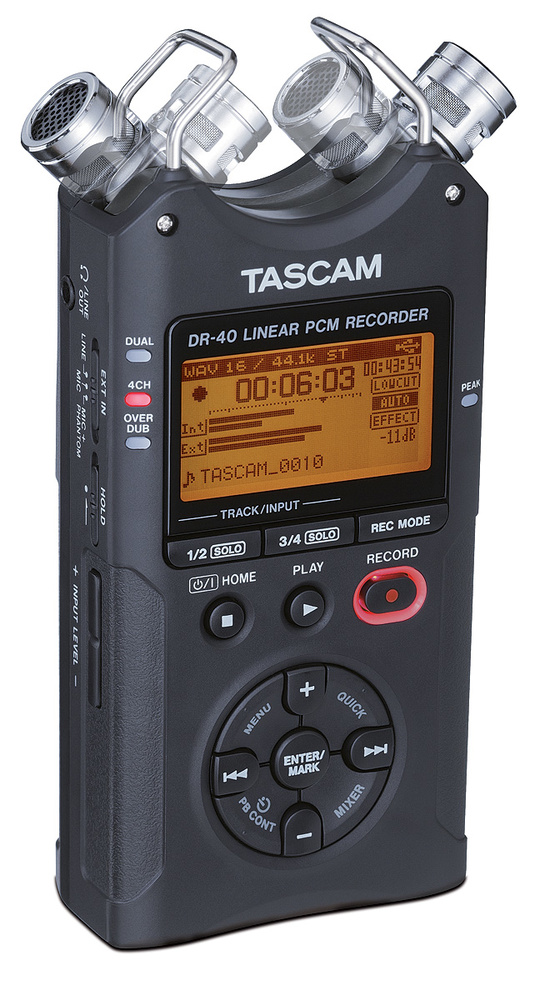
The role of the location recording kit was to record different sounds and dialogue that we wanted to really stand out in our film as it makes the sounds clearer and in better quality than if we hadn't used the recording kit and used the sounds off the normal footage. An example of this would be in our film when our female protagonist Alice runs up the stairs, the sound was too quiet on the camera footage so we had recorded her footsteps with the location recording kit from the same position as the camera was to pick up the noises much better.
The advantages to using this piece of hardware technology would be the fact that it is small and compact, easy to use and very good at picking up every sound that you need efficiently - which means you don't have to use the really quiet sound recording off the camera footage. Being small it means it is easy to hold up and out of sight of the camera and is able to be placed in smaller areas without any worries of it being spotted by the viewers.
The location recording kit is super easy to use and quick to assemble, so it means you are ready to film within seconds - providing the camera etc. is all set up and ready to go. This means its the perfect piece of kit for beginners or to stop time consuming messing around because it only takes a few attachments and you can then use it to record sounds. There is only a few buttons to remember and out of those only a couple or so are vastly important to operate the technology, so its not like a students worst nightmare.
A slight drawback to the location recording kits would be the fact that it does pick up on every single sound which means you could spend a while trying to get the perfect sound recording to go with the footage because different ambience noises keep occurring, like breathing or coughing, and some times cars driving past outside filming locations. Wind is another awful problem when using any sound recording device; it makes a nasty ruck-us down the headphone.
Another is that when you come to import the sounds you recorded onto the iMac (or whatever you are using at the time) its very time consuming and annoying trying to hunt down the many sounds you recorded, this being because the location recording kits are shared items so have many sounds on there. This created a disadvantage because one of my team then had to sit there transferring and listening continuously until he found our sounds - and then he had to hunt through all the bloopers.
Post-Production stage
Final Cut Pro X
Once we had filmed our main product we had to then edit the footage we had to create our desired film, which meant there had to be a change in the technologies we used. Been as throughout the filming stage we had used mainly hardware technologies, now it was time to move onto software technologies - these starting off with Final Cut Pro X. Like the DSLR camera, Final Cut Pro X is a new technology that we have had to train with as it is an updated version of the Final Cut Express we used in our AS course. We used this Final Cut Pro X to put together our footage by cutting it together and adding effects over the film etc. while we also used Final Cut Pro X in replacement of Soundtrack Pro which we used in the AS Course, so we also did our sound editing on Final Cut Pro X.
The advantages of Final Cut Pro X would be that it has everything in one. No longer do we have the difficulty of last year where we had to edit the footage in one programme (Final Cut Express) and then export it to another programme (Soundtrack Pro) to edit the sound and make sure everything sinks perfectly. Now we were able to edit it all together in the same piece of software so the chances of mistakes are considerably lower. This means the quality of our coursework has a better chance of being even better and less stressful.
Another advantage of the Final Cut Pro X is that it has its own title pages and effects that you can add onto your film footage to make it look a certain way - which really helped my production team and I with our film because we found two really good effects that matched our film and helped create what we wanted. With the old final cut pro we weren't able to do this, it was just the basic effects like black and white or sepia, so I feel this is a much better version to be using and is a lot easier once you get to grips with it.
However saying that, a drawback of Final Cut Pro X would be that it is actually a little harder to understand to begin with and you spend a while learning all the tricks about it, however once you get to grips with the software its a breeze to use and create some much better quality films than with Final Cut Express.
Once we had filmed our main product we had to then edit the footage we had to create our desired film, which meant there had to be a change in the technologies we used. Been as throughout the filming stage we had used mainly hardware technologies, now it was time to move onto software technologies - these starting off with Final Cut Pro X. Like the DSLR camera, Final Cut Pro X is a new technology that we have had to train with as it is an updated version of the Final Cut Express we used in our AS course. We used this Final Cut Pro X to put together our footage by cutting it together and adding effects over the film etc. while we also used Final Cut Pro X in replacement of Soundtrack Pro which we used in the AS Course, so we also did our sound editing on Final Cut Pro X.
The advantages of Final Cut Pro X would be that it has everything in one. No longer do we have the difficulty of last year where we had to edit the footage in one programme (Final Cut Express) and then export it to another programme (Soundtrack Pro) to edit the sound and make sure everything sinks perfectly. Now we were able to edit it all together in the same piece of software so the chances of mistakes are considerably lower. This means the quality of our coursework has a better chance of being even better and less stressful.
Another advantage of the Final Cut Pro X is that it has its own title pages and effects that you can add onto your film footage to make it look a certain way - which really helped my production team and I with our film because we found two really good effects that matched our film and helped create what we wanted. With the old final cut pro we weren't able to do this, it was just the basic effects like black and white or sepia, so I feel this is a much better version to be using and is a lot easier once you get to grips with it.
However saying that, a drawback of Final Cut Pro X would be that it is actually a little harder to understand to begin with and you spend a while learning all the tricks about it, however once you get to grips with the software its a breeze to use and create some much better quality films than with Final Cut Express.
FreeSFX.co.uk

The freeSFX & Audio network web resources were websites I had used for my AS product and I felt offered quite a lot of appropriate sounds for the type of film genre that I enjoy creating, as well as offering a wide range of soundtracks that go with many different genre types. Being on the internet, it was right there for me to access and enabled me to select the music I wanted and download it to the iMac for use in my film.
An advantage of this website is that the soundtracks and effects are all free of charge and they do not have any copyright laws attached to them, which means they are free for the taking, unlike many other web resources that offer music such as ITunes. Not everybody wants to pay for a random soundtrack, especially if its only for something simple and that they could potentially only use once; it seems like a waste of money, so this website really saved us from a film with either no music or extremely bad music.
Drawbacks of using these free sounds websites would be that sometimes the quality of the soundtracks aren't as good as the ones you'd buy - which could affect the work that you are trying to put the sounds onto. Furthermore the websites are often down which means you cannot access the sounds you need when you want to - a common problem with web resources.
Audio.lgfl.org.uk

Magazine:
QuarkXpress

QuarkXpress was the software I used to create my magazine review page for my film, which I used on the iMac. Again I'm going to quickly note down the disadvantages and the advantages of this piece of technology down below.
The advantages of QuarkXpress is that it has many powerful design tools that allow the user to get the exact design they want which enables the creation of unique and useful work. Without the powerful design tools, you could find that the tools aren't that good and that you have to do a lot more to get the end result that you wish for,
Another advantage of QuarkXpress is that it is easy to use as its all organized and presented neatly for you to find the tools you are looking for, without having to scavenge through millions of drop-down boxes etc. it's layout is really helpful for those who are just starting out.
Because QuarkXpress is designed to be used in the creation and editing of complex page layouts for such things as flyers or film page reviews it means it is much more efficient to use then a word document or Photoshop and so means less time is wasted because QuarkXpress has all of the tools you need to create the templates.
A drawback of QuarkXpress could also be the layout automation, as well as it being a good thing. It often got annoying while you were trying to place a text box or a shape of some sort down into a certain place and it wouldn't quite go into the area you wanted - this was a problem my team and I encountered briefly in our time of using the software however its easy enough to overcome.
Another drawback, that kinda counteracts a good point, is that QuarkXpress is rather hard to understand and learn quickly. Its a breeze once you know how but it takes a while to fully learn everything about it - which means you could be missing out on something that could put the edge on your work. This makes the software bad for beginners who are seeking something quick and easy to throw together a layout of some sort.
Film Poster:
White Backdrop

The white backdrop was used during the creation of my film poster when my production team and I made arrangements with our former cast members for them to come back so that we could take photos of them ready to be uploaded into a software called Photoshop.
The advantages of the white backdrop is that it makes life so much easier when operating Photoshop because it makes the background of the actor or object you are taking a photo of all one colour so that its easier to remove on the software.
Furthermore it gives a much more professional look to your work as you don't have any distracting objects in the background, only white which gives a crisper edge and makes whatever you capturing on camera stand out.
The drawbacks on the white backdrop is that it was very fragile and any slight fold in the material would show up on camera as a darker grey which wouldn't help in Photoshop and also took off from the professionalism.
Also shadows showed up much worse on the white backdrop so while we were taking the photos we had to make sure our key lights and a cast members were in a good position to stop their own shadows from sprouting up behind them and ruining the photo.
Key Lights x3

I used the key lights during the creation of the ancillary task: film poster. They were used to light up every angle of the white backdrop to erase any shadows that may were upon it as well as create any shadows we may want upon our cast members faces, or to get rid of them if they key lights were placed correctly.
The advantages of key lights would be that because they are so large they completely abolish any unwanted shadows as well as create them if you so desired. They help light up any sets that are too dark while you are filming and provide a nice natural glow - depending on the bulb that's in them and the intensity of the light.
However, the drawbacks of the key lights are a few. One, they are rather heavy to carry around and very cumbersome. This means they get very annoying to set up and if you are carrying them from set to set or moving them around for different lighting effects, you have your work cut out.
And two, the lights get incredibly hot which causes a risk because it could possibly burn you - if your silly enough to go near the bulb - but on the off chance that it topples or you did accidentally touch around the bulb and the metal flaps that are used to angle the light (which get hot as well).
Photoshop CS5.1

I used the key lights during the creation of the ancillary task: film poster. They were used to light up every angle of the white backdrop to erase any shadows that may were upon it as well as create any shadows we may want upon our cast members faces, or to get rid of them if they key lights were placed correctly.
The advantages of key lights would be that because they are so large they completely abolish any unwanted shadows as well as create them if you so desired. They help light up any sets that are too dark while you are filming and provide a nice natural glow - depending on the bulb that's in them and the intensity of the light.
However, the drawbacks of the key lights are a few. One, they are rather heavy to carry around and very cumbersome. This means they get very annoying to set up and if you are carrying them from set to set or moving them around for different lighting effects, you have your work cut out.
And two, the lights get incredibly hot which causes a risk because it could possibly burn you - if your silly enough to go near the bulb - but on the off chance that it topples or you did accidentally touch around the bulb and the metal flaps that are used to angle the light (which get hot as well).
Photoshop CS5.1
Photoshop CS5.1 was the piece of software which basically put together my film poster. It was how we combined together the photos we had taken on the white backdrop with text and in an appropriate style that look professional and attractive to an audience.
The advantages of Photoshop CS5.1. It enables the user to combine photos together and do so in a way that really makes the photos their own creation. It also lets them add their own backgrounds and texts as well as adapt single photos in a way they desire. This means they could create a film poster like my production team and I did from scratch and they could also just adapt a photo they have taken to an look even more professional if they did photography for example.
Photoshop allows for quick editing with its organized tools. Once you know the lay out of Photoshop CS5.1 then your away because they are all set out in an easily accessibly way that's labelled and then allows for quick editing of your images. Furthermore the tools that are provided also allow quick editing that is mostly precise, depending on the user, such as the ability to alter the size of the tool for quickness or for neatness. It's also easy to just automatically whiten teeth on a photo or to get rid of red eye with the click of a button.
One drawback of using Photoshop CS5.1 would be that yes it is easy to use once you get to know your way around it, but it takes a lot of training and studying to get to that point as it has so many different controls and things to do that you'd never know how to use it all without training with it first or playing around. Its not a software that you can easily get to grips with as soon as you start it up. It's very professional and aimed at the professionals so there is a lot to take in, so you can only learn the basics in a brief amount of time.
A drawback for me personally would be the expensive of the software as I wanted to take my media work home and work on it there instead of constantly at school, as it would save time but the expensive of getting the software myself stops that so I stuck with doing it at school - which restricts the time I could have on the creation of the poster.
Another drawback would be that some of the tool on Photoshop CS5.1 are rather clumsy and inefficient, although they are designed to make life easier, and so because of this you then have to fiddle even more with the image to fix the errors the tools did before. For example I felt that the background removal tools are a little clumsy in my experience.
Furthermore the original image when modified is ultimately destroyed - if you keep doing more and more changes and then feel something doesn't work and press undo, it only undoes so much which leaves you with a messed up image that you then have to open up another original, that you have taken care to save separately, which has no changes on at all, causing you to have to start from scratch. A way around this would be to keep saving and reopening the latest save but if you forget this then you do find yourself in a bit of a mess.
Technologies used to communicate with production team:
Email


The Great Wyrley High School email was used mainly if a member of my production team or myself needed to send each other a document that we all required. The advantages of using this technology was that every member of my team had the same email ending which meant you didn't have to hunt down their email address.
Furthermore the email provides an address book which allows the user to type in the name of the person they are looking for and are given their school email. It also allows you to attach files to the emails and send them to each other (obviously) and so is a more efficient way then printing them off and then losing them or making them dog-eared.
A drawback of using the school email, being picky now, could be that sometimes the school website is down and doesn't work for some time. If this happens you rarely can get onto your email due to the link being inaccessible. This causes a problem if you have any deadlines coming up and you need the work you attached to an email.
Also people may not get the information on time because not everybody constantly checks their emails and so if an email was sent Monday, they might not get it till Friday which by then could potentially be too late.
Mobile Phones
My production team and I mainly used mobile phones to get in contact with each other throughout the inter of the A2 media course. We used it in the construction stage to let each other know that we had filming on a particular day, that we were editing on other days, to keep tabs on what was being done of the blogs if we had shared work etc.
The advantages of using the mobile phones are the obvious reasons; it allowed to to easily get in contact without worrying about them taking forever to notice been as now-a-days every body has a phone and everybody carries it around with them, so it makes it quicker and more efficient to get hold of someone.
The drawbacks of the mobile phone is that if the other person hasn't got their phone on them or they are on vibrate, there is like minimal chances of getting hold of them - which this is the same for many things as well; like email (not at the computer, don't get it).
The mobile phones were also a problem because they are a distraction. We had them on our persons so that we could get in touch however there is still that urge to get them out and mess with them when you don't need to, which means it takes off from the time you could be doing something important.
Technologies used in the evaluation stage:
Emaze
Last year for my AS media course, I used a software called Prezi for some of my evaluation questions however this year I'm using a similar software called emaze, which is much better as it offers more ways of creating a presentation in much cooler ways like 3D rooms to go around in presenting your work.
Advantages of emaze are that it looks professional and fun at the same time, as well as it now much easier to create the presentations whereas prezi got rather confusing rather quickly while you were trying to make it zoom through different pages. Emaze allows just as much fun but on a more grounded basis and also presents your work in a nice way. Its so much easier because it is nicely organised and you get a small mini training session when you first sign up which tells you how to do everything straight away, and if you have any questions there is a nice big question mark which allows you to find out further information should you require any.
Drawbacks of emaze would be that it gets a little buggy in my experience of using it. I only created one presentation on it, first time, and many of my photos wouldn't work no matter what I did unless I copied their URL so that took a bit of time to sort out, as well as the music started to bug and wouldn't work which resulted in me removing it initially as I had no time to mess around to sort it out. I also had trouble sizing the shared presentation to my blog post - it was HUGE and I couldn't find a way of making it neater and smaller so I ended up editing its embedding code and altering the width from there.
Movie Maker
Last year for my AS media course, I used a software called Prezi for some of my evaluation questions however this year I'm using a similar software called emaze, which is much better as it offers more ways of creating a presentation in much cooler ways like 3D rooms to go around in presenting your work.
Advantages of emaze are that it looks professional and fun at the same time, as well as it now much easier to create the presentations whereas prezi got rather confusing rather quickly while you were trying to make it zoom through different pages. Emaze allows just as much fun but on a more grounded basis and also presents your work in a nice way. Its so much easier because it is nicely organised and you get a small mini training session when you first sign up which tells you how to do everything straight away, and if you have any questions there is a nice big question mark which allows you to find out further information should you require any.
Drawbacks of emaze would be that it gets a little buggy in my experience of using it. I only created one presentation on it, first time, and many of my photos wouldn't work no matter what I did unless I copied their URL so that took a bit of time to sort out, as well as the music started to bug and wouldn't work which resulted in me removing it initially as I had no time to mess around to sort it out. I also had trouble sizing the shared presentation to my blog post - it was HUGE and I couldn't find a way of making it neater and smaller so I ended up editing its embedding code and altering the width from there.
Movie Maker

Windows Live Movie Maker was a piece of software technology which I used within the evaluation question 1 to do a small voice over video on female representation, This software was the only thing I had available to me at home so I used it, but because its so out dated now, or more so not as good as the newer stuff - there are more drawbacks then advantages.
Advantages of movie maker would be that its quick and easy to use so if your a student trying to whim up a quick video its the best thing for you because its rather straight forward and doesn't require a lot of training - if any at all. This new version allows you to create the project and then instantly upload it to a shared place such as YouTube or Facebook which is an upgrade from the last. This means that if you create the video you have a short cut to uploading instead of publishing it to your computer and then uploading again to YouTube; it cuts out the middle man so to speak.
Drawbacks would be many. The first is that you can't overlap any sound and images, its all aligned in rows and so limits your creativity a lot because you can't then blend any music together should there be a gap that needs sorting or if you had to delete a patch of the sound - you can't mask it through overlapping. Another drawback would be that its poor quality, The sound recording is very noisy and doesn't allow for a nice crisp recording, you can hear my laptops fan on it which doesn't sound very professional, You are limited as to what effects you can add to the video because there is only a handful to pick from and the animations available aren't especially great either. Furthermore movie maker can become rather slow the more media you put into it, which wastes time and effort and can sometimes freeze, resulting in the loss of any unsaved work.
